
はじめに
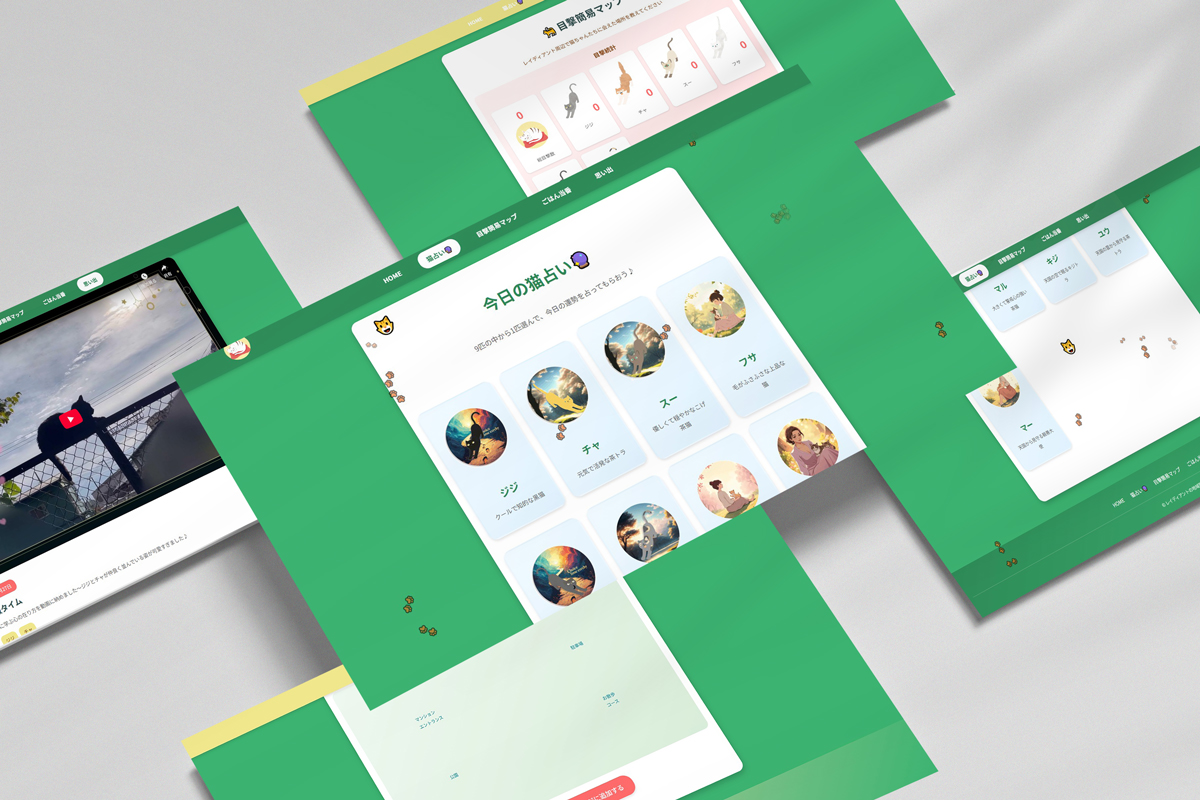
今回は地域猫のサイトで作った猫占いの機能を詳しく解説します。
9匹の猫から1匹を選んで運勢を占うという、シンプルながらも魅力的なUIにしたく
インタラクティブな占いサイトを実現するJavaScriptの実装をClaude.aiに手伝ってもらいました
サイトの機能概要
このサイトでは以下の機能が実装されています。
- 9匹の猫のカードをクリックして選択
- 選択した猫に基づいて今日の運勢を表示
- ラッキーアイテム、ラッキーカラー、ラッキースポットを表示
- 「もう一度占う」ボタンで結果をリセット
実装の全体像
猫占いの実装は大きく分けて以下の要素で構成されています。
1. データ構造の設計
まず、各猫の情報と占い結果をJavaScriptオブジェクトとして管理します。
const catData = {
  gigi: {
    name: 'ジジ',
    description: 'クールで知的な黒猫',
    image: 'image/gigi01.png',
    fortunes: [
      {
        message: '今日は新しい発見がありそう。好奇心を大切に。',
        luckyItem: 'ノート',
        luckyColor: '紺色',
        luckySpot: '図書館'
      },
      // 複数の運勢パターン
    ]
  },
  cha: {
    name: 'チャ',
    description: '元気で活発な茶トラ',
    image: 'image/cya01.png',
    fortunes: [
      {
        message: 'エネルギーに満ちた一日。積極的に行動しよう。',
        luckyItem: 'スニーカー',
        luckyColor: 'オレンジ',
        luckySpot: '公園'
      },
    ]
  },
  // 他の猫のデータ...
};
2. イベントリスナーの設定
ページ読み込み時に各猫のカードにクリックイベントを設定します。
document.addEventListener('DOMContentLoaded', () => {
  // すべての猫カードを取得
  const catCards = document.querySelectorAll('.cat-card');

  // 各カードにクリックイベントを設定
  catCards.forEach(card => {
    card.addEventListener('click', () => {
      const catId = card.dataset.catId;
      showFortune(catId);
    });
  });

  // 「もう一度占う」ボタンの設定
  const resetButton = document.getElementById('reset-button');
  resetButton.addEventListener('click', resetFortune);
});
3. 占い結果の表示ロジック
選択された猫に基づいて、ランダムに運勢を選んで表示します。
function showFortune(catId) {
  const cat = catData[catId];

  // 運勢をランダムに選択
  const fortune = cat.fortunes[
    Math.floor(Math.random() * cat.fortunes.length)
  ];

  // 結果表示エリアを取得
  const resultSection = document.getElementById('fortune-result');
  const catImage = document.getElementById('selected-cat-image');
  const fortuneMessage = document.getElementById('fortune-message');
  const luckyItem = document.getElementById('lucky-item');
  const luckyColor = document.getElementById('lucky-color');
  const luckySpot = document.getElementById('lucky-spot');

  // 選択された猫の情報を表示
  catImage.src = cat.image;
  catImage.alt = cat.name;
  fortuneMessage.textContent = fortune.message;
  luckyItem.textContent = fortune.luckyItem;
  luckyColor.textContent = fortune.luckyColor;
  luckySpot.textContent = fortune.luckySpot;

  // 猫選択エリアを非表示、結果エリアを表示
  document.getElementById('cat-selection').style.display = 'none';
  resultSection.style.display = 'block';

  // スムーズにスクロール
  resultSection.scrollIntoView({ behavior: 'smooth' });
}
4. リセット機能
「もう一度占う」ボタンで初期状態に戻します。
function resetFortune() {
  // 結果エリアを非表示、選択エリアを表示
  document.getElementById('fortune-result').style.display = 'none';
  document.getElementById('cat-selection').style.display = 'block';

  // トップにスクロール
  window.scrollTo({ top: 0, behavior: 'smooth' });
}
重要なテクニックの解説
Math.random()を使ったランダム選択
占いサイトの核となる「ランダム性」はMath.random()を使って実現します。
// 0以上1未満の乱数を生成
const random = Math.random();

// 配列の長さを掛けて整数に変換
const index = Math.floor(random * array.length);

// ワンライナーで書くと
const randomItem = array[Math.floor(Math.random() * array.length)];



dataset属性の活用
HTML5のdata属性を使って、HTMLとJavaScriptのデータをシームレスに連携します。
<div class="cat-card" data-cat-id="gigi">
  <img src="image/gigi01.png" alt="ジジ">
  <h3>ジジ</h3>
</div>
// JavaScriptからdata-cat-idを取得
const catId = card.dataset.catId; // "gigi"
DOMContentLoadedイベント
ページのHTML解析が完了した時点で実行されるイベントです。画像などのリソース読み込みを待たないため、window.onloadより高速に実行されます。
document.addEventListener('DOMContentLoaded', () => {
  // ここにDOM操作のコードを記述
});
scrollIntoViewでスムーズスクロール
結果表示時に自動的に結果エリアまでスクロールする機能です。
element.scrollIntoView({
  behavior: 'smooth',  // スムーズにスクロール
  block: 'start'       // 要素を画面上部に配置
});
アニメーション効果の追加
より洗練されたUIにするため、CSSトランジションと組み合わせることができます。
function showFortune(catId) {
  // ... 既存のコード ...

  // フェードイン効果
  resultSection.style.opacity = '0';
  resultSection.style.display = 'block';

  // 次のフレームで透明度を変更(トランジション発火)
  requestAnimationFrame(() => {
    resultSection.style.opacity = '1';
  });
}
対応するCSSは以下の通りです。
#fortune-result {
  transition: opacity 0.5s ease-in-out;
}
エラーハンドリング
実際の開発では、存在しない猫IDが渡された場合などのエラーハンドリングも重要です。
function showFortune(catId) {
  // データの存在チェック
  if (!catData[catId]) {
    console.error(`猫ID "${catId}" が見つかりません`);
    return;
  }

  const cat = catData[catId];

  // fortunesが空の場合のチェック
  if (!cat.fortunes || cat.fortunes.length === 0) {
    console.error(`猫 "${cat.name}" の運勢データがありません`);
    return;
  }

  // ... 既存のコード ...
}
ローカルストレージで「今日の運勢」を保存
同じ日に何度も占える仕様だと運勢の意味が薄れてしまうため、日付をキーにして結果を保存する実装も考えられます。
function getTodayKey() {
  const today = new Date();
  return `fortune-${today.getFullYear()}-${today.getMonth() + 1}-${today.getDate()}`;
}

function saveTodayFortune(catId, fortune) {
  const data = { catId, fortune, timestamp: Date.now() };
  localStorage.setItem(getTodayKey(), JSON.stringify(data));
}

function loadTodayFortune() {
  const saved = localStorage.getItem(getTodayKey());
  return saved ? JSON.parse(saved) : null;
}
ただし、このサイトの仕様ではlocalStorageは使用できないため、実装する場合は別の環境で行う必要があります。
まとめ
猫占いサイトのJavaScript実装では、以下の技術が活用されています。
- オブジェクトによるデータ管理
- イベントリスナーによるインタラクション
- Math.random()によるランダム選択
- DOM操作による動的なUI更新
- スムーズスクロールによるUX向上
シンプルな構成ながらも、ユーザーに楽しい体験を提供する工夫が随所に見られます。
これらのテクニックは他の占いサイトやクイズアプリなど、さまざまなインタラクティブコンテンツに応用できます。
ぜひ、自分だけのオリジナル占いサイトを作ってみてください
最後まで目を通していただきありがとうございました。


コメント